If you need the quick answer, here you have it. Use a report card when you want a clean grading-period summary. Use a gradebook report card when you want that summary plus the graded assessments behind it. In DreamClass, both options help schools share progress clearly, answer parent questions faster, and keep reporting organized in one place. So, we have report card vs gradebook report card.
Let’s see what’s included:
What is a report card in DreamClass?
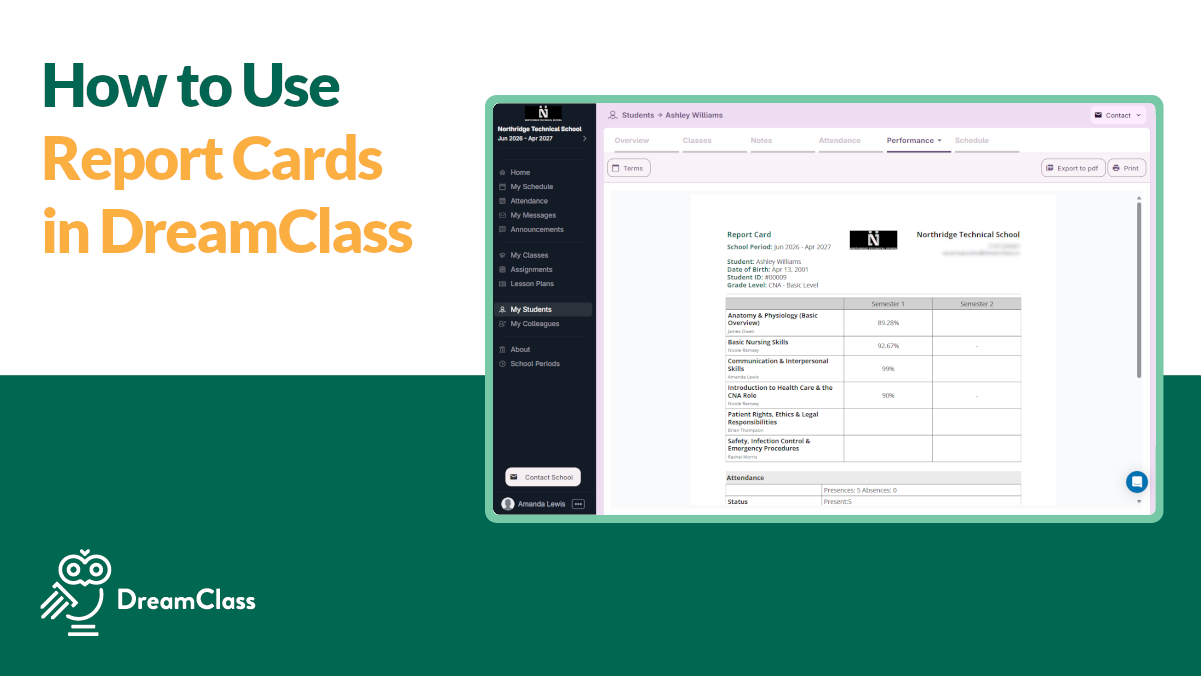
A report card in DreamClass is the academic progress report for a student, across the school year’s grading periods, such as terms, quarters or semesters.
It shows the average grade the student achieved in each grading period, for each course. That’s perfect when you want a clear, formal summary of progress, without showing every underlying assignment, quiz or test.
This is usually the right choice when you want to share a clean end-of-term progress report summary and keep attention on official grading-period results. And it also works well when families need a quick snapshot, when staff need printable records, or when school leaders want a polished document for meetings or files.
More specifically, schools often choose the standard report card to:
- Share a clean end-of-term progress summary
- Give families an easy snapshot of performance
- Print professional-looking academic records
- Focus attention on official grading-period results
For many schools, this is the type of report used for parent communication, internal academic review, or standard progress documentation. It stays readable and, just as important, it keeps the conversation centered on the result, rather than on every individual grade entry.
What’s the difference between a report card and a gradebook report card?
A report card shows the student’s final average grade for each grading period, in each course. A gradebook report card shows that same grading-period average, plus the individual graded assessments behind it.
So, if you’re looking at and comparing a report card vs gradebook report card in DreamClass, that’s actually the core difference. One gives families the bigger picture. The other gives them the bigger picture and the details behind it.
If you’re wondering why you should need that, consider the need. When a school wants a clean, easy-to-read summary, the standard report card is usually the better fit. However, when teachers, administrators, students, or guardians need more visibility into how a grade was built, the gradebook report card gives them that extra layer that would otherwise be just clutter.
For private schools, homeschool collectives and training programs, that flexibility’s a big advantage. You don’t need (or want) separate systems for grade entry, final grade reporting and parent visibility. DreamClass keeps all of it connected in one place.
But, let’s look at it a bit more in-depth:
What’s a gradebook report card in DreamClass?
A gradebook report card includes the same grading-period average as the standard report card. In addition, it also displays the graded assessments from the teacher gradebook, including grade columns that contributed to the course result.
That’s what makes it more detailed and more instructional (if you need the details).
So, instead of only seeing the final average for Quarter 1, Term 1, or Semester 1, you can also see the graded work behind that number. As a result, the gradebook report card is especially helpful when schools want to answer common parent and teacher questions, without opening several screens or sending follow-up emails. And that’s a great time-saver and peace-of-mind feature that ensures accuracy of information.
More specifically, in practice, it helps answer questions like:
- Which assessments were included in the average?
- How did the student perform across different tasks?
- What explains the final grade for this grading period?
- What should families or students review before the next grading period?
For schools that want more transparency, this format can reduce back-and-forth communication, because the supporting grade detail is already included. Besides, you know better than we do, that’s often the difference between a report that ends a conversation and one that starts three more emails.
How does DreamClass calculate what appears on the report card?
To reduce admin clutter, DreamClass separates the teacher gradebook from final grades. The teacher gradebook is where teachers enter grades. Then, the final grade is the grade that is actually calculated and displayed on the report card.
A typical workflow looks like this:
- The teacher enters grades in the teacher gradebook.
- An admin or an authorized user copies the relevant grading-period grade into final grades.
- DreamClass uses that final grade in the student’s report card.
- The report card then shows the result under the respective grading period.
So, if a school wants the official report card to reflect teacher-entered grading data, the handoff happens through the final grades area. This keeps report cards structured and consistent, especially when schools want oversight before grades are formally shared.
▶️ Watch the video:

0:01 Hi, this is Lida. Welcome to DreamClass.
0:04 In today’s session, we’re going to see how we can set up our key admin operations using DreamClass. Previously, we were in the teacher grade book, but
0:11 now I’m in the final grades. The teacher grade book is where the teacher enters all of their grades. And in the final is the one grade that is actually
0:18 calculated in the report card. You can click copy from the teacher grade book.
0:23 You can select to copy the quarter one grades. And you can see that it’s 80 like it was before. Let’s see how the
0:31 report card looks like. If you go to “George” and you navigate from the grading and evaluation, select the report card and you will see that reading has 80
0:40 under quarter
When should you use a standard report card instead of a gradebook report card?
That’s simple. Just use the standard report card when clarity matters more than detail.
It’s often the better option when you want to give families or students a quick, polished view of academic progress. And it’s also helpful when your school needs a simpler document for meetings, records or routine distribution.
Choose the standard report card when you want to:
- Keep the layout clean and easy to scan
- Emphasize final grading-period results
- Avoid overwhelming families with assignment-level detail
- Provide a more official-looking progress document
For many smaller-sized schools, this is the easiest way to share progress, while keeping communication simple.
When should you use a gradebook report card instead?
Well, we recommend you use the gradebook report card when people need context, not just conclusions. 😉
It works great when parents ask how a grade was formed, when teachers want to show performance trends, or when students need a more detailed review of their work.
Choose the gradebook report card when you want to:
- Show the individual assessments behind a grading-period average
- Make grade conversations more transparent
- Help students understand where they did well or struggled
- Reduce manual explanation from teachers and admins
For schools that want, say, better visibility without exporting data into another tool, this report is often the better fit. So, that’s great for schools already exploring online gradebooks and more transparent parent reporting.
Why does this difference matter for growing schools?
Well, you see, a lot of schools outgrow spreadsheets at exactly this point.
At first, tracking grades is manageable. Then, families want clearer updates. Teachers want better reporting. Administrators need records that look professional. And, soon, the question is no longer whether grades are stored somewhere. It becomes whether your school can share progress clearly, consistently, and without adding extra admin work.
So, that’s where DreamClass becomes more than a gradebook software solution.
Because DreamClass connects gradebooks, final grades, student records, teacher workflows, and parent visibility, schools can choose the right report for the right situation, without rebuilding data each time. DreamClass supports gradebooks, assessments, report cards, student profiles, parent access, and broader academic record management in one system. And that, in turn, makes it easier to move from raw grade entry to clear, shareable reporting.
What makes DreamClass useful for report cards and student progress reporting?
DreamClass doesn’t treat reporting as a disconnected afterthought. It connects the daily work of grading with the reports families and staff actually need.
To that end, key advantages include:
- Gradebook management: Create and manage gradebooks by class and grading period
- Automatic averages: Reduce manual calculation and reporting errors
- Final grade workflow: Separate working grades from official report-card grades
- Student and guardian visibility: Share academic progress more clearly
- Academic records in one place: Keep report cards, assessments, and performance data connected
This matters for buyers evaluating school software. A platform that handles both daily grading and formal reporting can save time, cut confusion and improve the family experience, through better parent communication.
As one reviewer put it,
Great option for small schools!
One stop shop for gradebook, parent communication, school calendar, annoucements, and invoicing. I love the customer service and the easy to use platform and it can be customized for your individual school. When issues have come up, the support team will get on a call with you and show you how to navigate or fix any issue you are having.
Principal Religious institutions
Another said,
Review of Dreamclass
DC is great for organizing and sharing student records. At first, DC had some templates for school records (gradebooks, schedules, etc.) that make sense for most schools, but didn’t make sense for us since our school functions slightly different from most. However, DC was able to accommodate our needs by making small adjustments that made a big difference for us.
Artistic Director Music
And, isn’t that what schools often need most? One place to manage progress and communicate it clearly?
How can schools explain the difference to parents and guardians?
Let’s keep the explanation simple:
The report card shows the final result for each grading period. The gradebook report card shows the final result plus the graded work behind it.
We think that phrasing helps families understand why both reports exist and why a school might use one instead of the other. It also sets expectations before questions come in.
So, for example:
- Use the report card for a quick progress summary.
- Use the gradebook report card for a more detailed performance breakdown.
Clear language like this builds trust and also saves staff time.
Why choose DreamClass for report cards instead of patching together separate tools?
If you ask us, separate tools create separate problems.
Picture this: One tool tracks grades. Another stores records. Another handles family communication. Then someone still has to reconcile the numbers, format the reports and explain the results.
DreamClass reduces that friction. You can manage grades, prepare final results, generate report outputs, and keep student progress organized. And all of that, in one platform. For schools that want structure without enterprise complexity, that’s a practical advantage.
If your school needs to send a clear end-of-term summary, the report card gives you that. If your school needs to show the grading detail behind that summary, the gradebook report card does that too.
That flexibility helps schools look more organized, communicate more clearly, and strengthen student progress tracking every grading period.
What’s the final takeaway on report card vs gradebook report card?
Well, here is the simplest way to remember it:
- Report card: final average grade per grading period, per course
- Gradebook report card: final average grade per grading period, per course, plus graded assessments from the teacher gradebook
If you need a polished progress summary, use the report card. But, if you need the story behind the grade, use the gradebook report card.
DreamClass supports both, which makes it a strong fit for schools that want clearer reporting without adding more admin work.
What’s next?
Want a school system that helps you track grades, organize student records, and share clear progress reports without juggling spreadsheets? DreamClass gives you one place to manage gradebooks, final grades, report cards, and family visibility.
Start with the report that fits your school best, then scale from there.
Related Reads on report card vs gradebook report card
FAQ
Frequently Asked Questions
about Getting started with Report Cards in DreamClass
Is a gradebook report card more detailed than a standard report card?
Yes. A gradebook report card includes the grading-period average and the graded assessments behind it. A standard report card focuses on the final average for each grading period and course.
Which report is better for parents?
That depends on what parents need. If they need a quick summary, the standard report card is usually better. If they want to understand how the grade was built, the gradebook report card is the better choice.
Can schools use both report types in DreamClass?
Yes. That’s one of the practical benefits here. Schools can use the standard report card for clear formal reporting and the gradebook report card when they want more transparency.
What appears on a DreamClass report card?
A DreamClass report card shows the average grade a student achieved in each grading period, for each course. Depending on the report type, it can also include graded assessments from the teacher gradebook.
Why does this comparison matter when choosing school software?
Because schools don’t just need a place to enter grades. They also need a simple way to share progress, explain results, and keep academic records organized. This comparison shows whether a platform supports both summary reporting and detailed grade visibility.