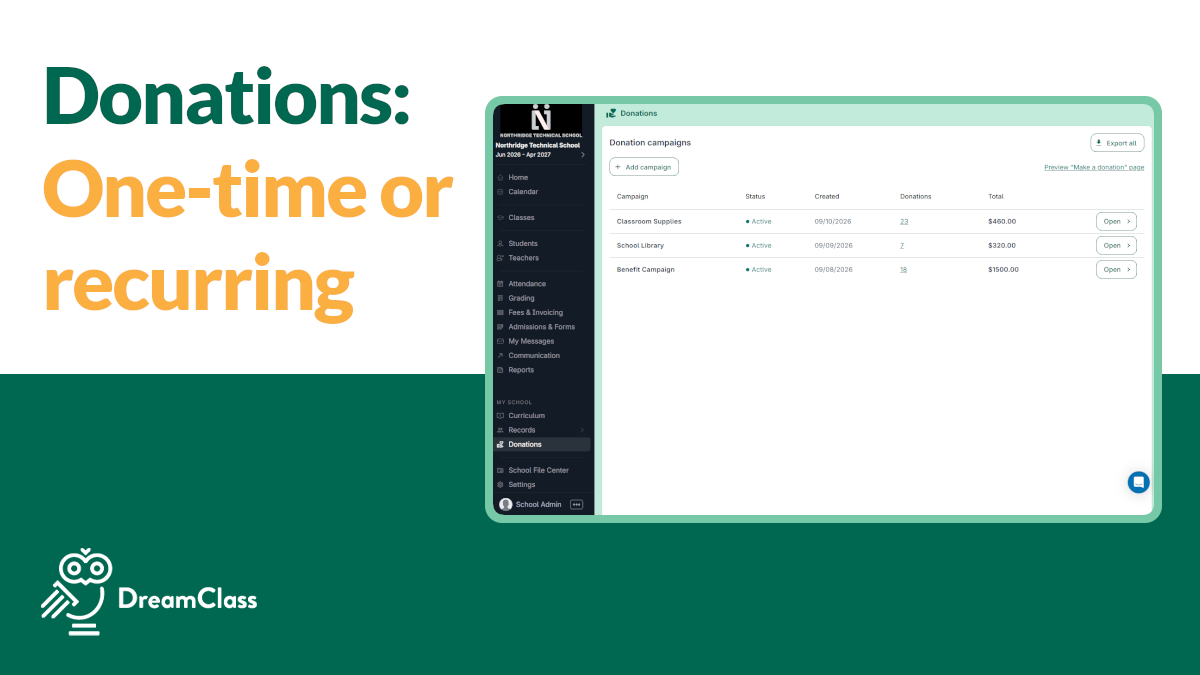
This guide shows how to turn on Donations in DreamClass, build a campaign, and publish it. You’ll be tracking school funding donations in about ten minutes, start to finish.
Why Do Schools Need an Easier Way to Collect School Funding Donations?
A damaged bridge, a leaky roof, or a new science lab are real scenarios. Now, all of that costs money that tuition alone rarely covers. DreamClass’s Donations feature lets any school collect school funding donations directly through the platform parents and staff already use. There’s no signing up for a separate fundraising tool. You set up a campaign, publish a donation link, and start collecting online gifts in about ten minutes.
Let’s walk through the full workflow. By the end of it, you’ll be turning the feature on, building your first campaign, publishing it, and tracking what comes in. Let’s learn:
How Does the Donations Feature Work in DreamClass?
Donations live in the left-hand navigation menu, alongside attendance, billing and gradebook, so there’s no second login or separate donor database to maintain. An admin builds a campaign, publishes a public donation page, and shares the link. Donors pick an amount, enter a card, and get an automatic thank-you message. It’s the same flow you’d expect from any tool built specifically for school donations online. New gifts then show up in your Donations dashboard the same way a new invoice shows up in Financial Management.
How Do You Turn Donations On or Off?
Not every school runs fundraising campaigns. So, “Donations” ships as an optional module. If your school doesn’t need it, go to Settings, scroll to Manage Features, and select Deactivate. The feature disappears from the left-hand menu immediately, and you can reactivate it the same way later, if (or when) your plans change.
Step 1: How Do You Create a School Funding Donations Campaign?
Start in Donations and select Add Campaign. This is where a cause turns into something donors can actually act on. DreamClass keeps the builder intentionally simple, so an admin with no fundraising background can set up a real campaign in minutes. Three fields drive this step:
- Name: That’s the cause itself, written the way you’d say it out loud to a parent, something like “Restore the Bridge,” not “Facilities Fund Q3.”
- Reason: A short description of what the money covers, so donors understand the ask before they give.
- Amount options: Fixed suggested amounts (say, $25, $50, $100) plus an open “Other” field so donors can enter whatever they want.
That’s the whole first step. No separate fundraising account, no code required.
Step 2: How Do You Customize Share & Publish Settings for School Funding Donations?
Open the Share & Publish tab on your new school donations campaign. This is where a campaign stops being an internal draft and starts looking like something your community can give to. Every setting here shapes what a donor sees and experiences on the public page, before they ever enter a card. Four settings control that donor-facing experience:
- Campaign name: the public-facing title donors see on the donation page itself.
- Minimum donation amount: optional, but useful if you want to enforce a floor. A $10 minimum, for example, keeps processing fees from eating up a disproportionate share of very small gifts.
- Thank-you message: a template donors see immediately after submitting, confirming the gift and reinforcing the cause.
- Publish toggle: flip this on when you’re ready to go live. Until you do, the campaign stays in as a draft and no one outside your admin team can see or use it.
Once the toggle is on, copy the generated link from the campaign page. That single link is everything you need to start collecting school donations online. No separate hosting, no additional account to configure, no extra fee to enable it. You’ll share that link with your community in Step 3.
Step 3: How Do You Share the Link and Track School Donor Contributions?
Share the published link through email, your newsletter, or social posts, the same channels you’d already use for school fundraising campaign updates. A donor who clicks it sees your campaign name, reason, and amount options. Then, picks a figure (fixed or custom) and enters a card number. They get the thank-you message on screen immediately. The gift lands in your Donations dashboard as a new entry, reviewable alongside the rest of your school’s financial activity.
Can You Run More Than One School Fundraising Campaign at Once?
Schools running several fundraisers at once, such as a building fund alongside a field-trip collection, get a public donations page. It lists every active campaign in one place. Donors browse causes and give to whichever one matters to them. You manage all of them from the same Donations section, for convenience.
▶️ Watch the video:
0:00 Hi there, this is Lida, and welcome to another video here at DreamClass, where we’re going to learn everything about our new feature called Donations.
0:13 So, essentially, a lot of our customers wanted to be able to raise funds for different reasons, and now you’re able to do just that.
0:21 On the left-hand side menu of your screen, you will see Donations. If your school doesn’t want this function, and you don’t need it, go to settings, scroll.
0:32 all the way down from this bar, select Manage Features, and you can click Deactivate. As soon as you do that, it gets deleted from the left-hand side, and you no longer see that from here.
0:47 So if you’re one of the schools that don’t need that, thank you for watching this video up until now, you can go.
0:54 The rest of the customers that actually want to use this, you can go to Donations, and three steps is all you need to do, and your donation link is management page is live.
1:06 The first thing is select add campaign, as soon as you add your campaign is simply, uhm, like this, you have first a name, so it’s time to restore the bridge.
1:20 Because in this example, a wooden bridge, uh, at my, at the entrance of my school has been, uhm, as fortunately after heavy rain, it suffered a significant damage.
1:32 Right, so in this scenario, I added the reason at the top, I added the amount, so you can add some fixed amounts, and you can also leave it as other, and then the end user can add their own amounts.
1:45 In the Share & Publish tab, there are a few customizations that I want you to see. First, you give the campaign a name.
1:52 The minimum donation amount, if you want to have $10 as the minimum donation, you can enforce that. A thank you message that the user sees on the screen when they submit their donation, you can add the, uhm, template.
2:08 I have a template specifically for every donor, and that is it, and as soon as you’re, you’re ready to publish your donation, like, form, you have to toggle this into on.
2:24 And your campaign is active. Then copy the link and share it with your community. So this is the one that I’ve built.
2:34 Help us rebuild our school bridge. We are raising funds to repair the bridge. Our goal is to raise $50,000. Every donation helps.
2:43 So if I don’t want to do that, I can add 5,000 and I can make the donation. Now, obviously, um, as soon as I make my donation and I enter my card, that is all, everything that the per, that happens.
3:02 And then as soon as this happens, the user gets the thank you note, and then you see this as a new donation in your donations.
3:10 And here, the last thing, the last thing to see is that if you are running multiple fundraisers for different reasons, you will be able to have a public donation page and different causes for your audience and all your campaigns will be placed right here.
3:28 That is it Let us know if you have any questions, and if you need any help or just an email away, contact us at support@dreamclass.io or leave a comment down below and let us know what you think of this and if this will work for your school.
3:45 Thank you for watching, and have a beautiful, beautiful day. Bye!
Where Do Donations Fit Into the Rest of DreamClass?
Even though the Donations module can be turned off, it isn’t just a bolted-on extra. It sits next to Financial Management. A gift gets the same card-based processing via Stripe, alongside Google Pay and Apple Pay, that your school already uses for tuition invoices. Guardians who use the parent portal for tuition payments will recognize the same card-entry flow when they give to a campaign. It also connects naturally to DreamClass’s threaded messaging tools. That makes it simple to notify your community when a new campaign launches, without leaving the platform to draft a separate email blast.
That one-place approach is a recurring theme in how schools describe DreamClass.
An office assistant put it plainly: “Instead of using 2–3 different platforms to collect student registration, collect payment and make contact with parents, all 3 of these are done in one place.”
Thank you for making my tasks easier!
I like that is makes my job a lot easier compared to all the data entry and emails I used to send most are automated now. Instead of using 2-3 different platforms to collect student registration, collect payment and make contact with parents, all 3 of these are done in one place. The Dreamclass team has been so helpful!!!!!!!!!!!!
Office AssistantEducation management
A director of operations, noted that “billing is connected to Stripe and is easy to set up.”
Affordable, accessible & wonderful customer service!
We are a small nonprofit afterschool program with about 200 students, some in-person and some online.School periods, courses, and classes are all easy to create, enroll students in, and manage. Attendance is easy for our teachers to complete and on the admin side, it is easy to get reports on daily absences and student attendance summaries.Student profiles allow for UNLIMITED custom fields (other products charge per custom field), which was useful for us as we ask a lot information of our youth (demographic, short answer, health information, learning accommodations etc) and that information is helpful for us to have visible on the student profile. Billing is connected to Stripe and is easy to set up. Invoices can be created and sent manually or automatically on a variety of schedules. Payment schedules can easily be set up for monthly, one-off, or periodic fees, and there is no limit to the number of fees/payment plans created. It is easy to pull reports of unpaid, overdue, or uninvoiced payments. Transcripts are easy to create and download from completed courses. Student information is kept in the system (creating an automatic alumni database) and there is no maximum number of student profiles or accounts. Product is intuitive and even our less-tech-savvy staff have learned how to use it quickly. I would write more but I am running out of characters!
Director of Operations & Study AbroadEducation management
That same payment rail now powers donation collection.
Compare that to how most platforms handle fundraising. Blackbaud’s Raiser’s Edge NXT and FACTS Giving are both separate, enterprise-grade products layered on top of a school’s core system. Several widely used SIS platforms (PowerSchool, Infinite Campus, QuickSchools) rely on third-party integrations like Donately or FundRabbit rather than a native tool. Of course, there are good reasons why these work like they do. But DreamClass’s version trades some of that specialized firepower for something smaller schools tend to value more. That’s one login, one dashboard and no new vendor relationship to manage.
Donations sound good?
Related Reads
FAQ
Frequently Asked Questions
Can donors give anonymously?
The way our Donations module works, it collects a card payment but doesn’t require a separate donor account. So, donors aren’t forced to create a profile just to give.
Is there a minimum donation amount?
Only if you set one in Share & Publish settings. Leave it blank and donors can give any amount, through the open “Other” field.
Can we run more than one campaign at a time?
Yes. Active campaigns all appear together on your school’s public donations page, so donors can choose which cause to support.
Are donations to schools tax-deductible for the donor?
That depends on your school’s tax status and the donor’s own situation, not on DreamClass. Donations to a qualifying nonprofit school are generally deductible, but the rules around what counts and how much can be claimed vary. If you need an idea how this works, you might see TurboTax’s overview of charitable contributions to nonprofit schools for the details, and point donors to a tax professional for their specific case.
Are grants to schools handled the same way as school funding donations?
No. Grants to schools typically come through a formal application and award process with an outside funder. The Donations feature covers direct, one-time or recurring gifts from your own community instead, and grant funds are still best tracked through Financial Management.
What are the best online platforms for school fundraising campaigns?
There’s no single best platform for school funding donations in the US; it depends on what you already use. Enterprise-focused tools like Blackbaud’s Raiser’s Edge NXT and FACTS Giving offer the deepest fundraising features, but run as separate systems from your SIS. Native options like DreamClass keep donations inside the same platform you already use for attendance and billing. Bolt-on integrations like Donately or FundRabbit add fundraising to an SIS that doesn’t have it natively. The right fit depends on whether you want a dedicated fundraising platform or one more tool folded into your existing system.
How to start a fundraising campaign for school donations online
Create a campaign in Donations, configure your Share & Publish settings, then copy and share the published link. Most schools go from idea to a live donation page in under ten minutes.
What donations do schools need?
Schools most often raise money for things tuition doesn’t cover: facility repairs like a damaged bridge or a leaky roof, new equipment such as a science lab, field trips, or one-off emergencies. Donations work for any cause you can name and describe in a campaign.
Who do we contact if we run into an issue?
Email support@dreamclass.io and the support team can help with your questions.