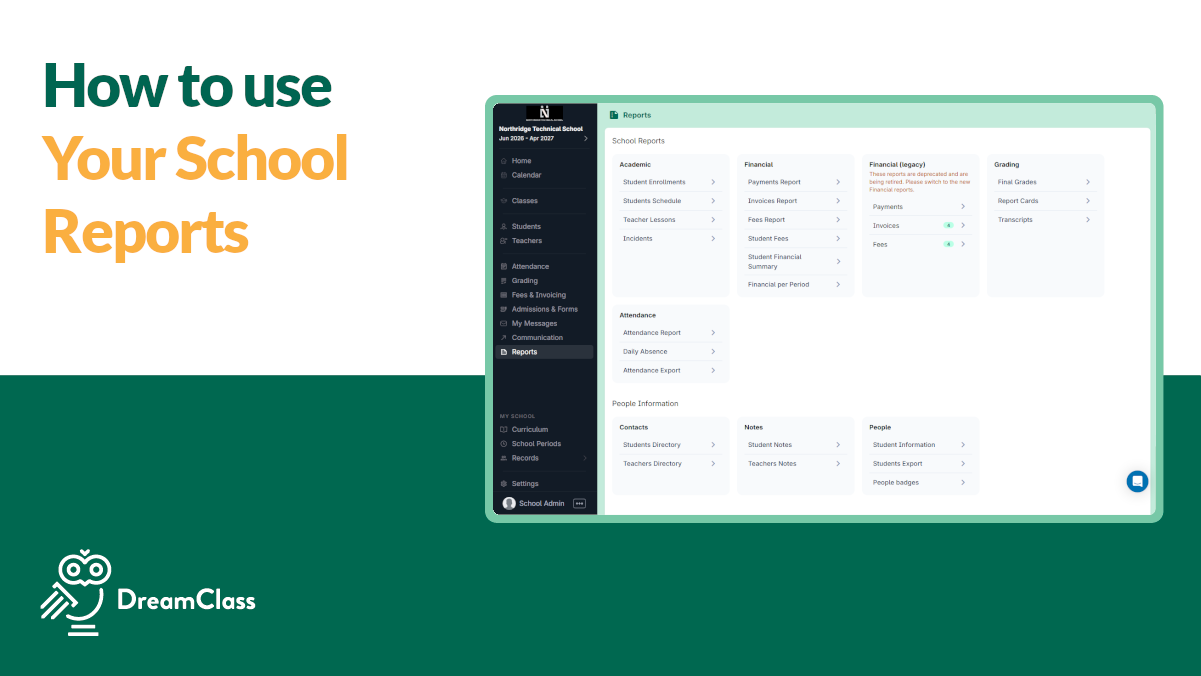
DreamClass reports let you instantly see student data, enrollments, and payments in one place and export them whenever you need.
If you’re running a private school, homeschool collective, or training program, DreamClass reports are what replace guesswork with confidence. In this guide, you’ll see how DreamClass reports work, which report to use in common situations, and how to turn everyday data into clear decisions, without spreadsheets or technical overhead.
Why reporting matters more than you think
Most education leaders don’t struggle because they lack data, but because information is scattered across spreadsheets, emails, notepads, and separate tools.
DreamClass reports bring students, families, enrollments, and finances together into clear views you can export, share, or review at a glance, building on the core capabilities of DreamClass as a modern student management platform. And, as a result, you spend less time chasing numbers and more time running your school.
What types of reports are available in DreamClass?
DreamClass focuses on practical, admin-ready reports. These are working documents you can actually use. So, not abstract analytics dashboards.
1. Generic information reports (student & family summaries)
The Generic Information Report gives you a complete snapshot of your records.
You can use it to:
- View student profiles in one place
- Include parent or guardian contact details
- Export everything as a CSV or Excel file
This report is useful when you need a clean backup, want to review records quickly, or need to share data with another system.
2. Enrollment reports (who is enrolled in what)
The Student Enrollment Report shows:
- Each student in your school or program
- The classes or courses they’re enrolled in
- The academic period those enrollments belong to
In practice, this helps you confirm class rosters, double-check enrollment accuracy and review how students are distributed across classes.
3. Financial reports (payments and outstanding balances)
Financial clarity is one of the biggest administrative stress points.
DreamClass Financial Reports, powered by built-in financial management tools, let you:
- See which invoices are paid, unpaid or overdue
- Review payments by month or year
- Export summaries for accounting or audits
Many schools share these exports directly with their accountant, so financial conversations are based on facts, not assumptions.
Which DreamClass report should you use; and when?
If you’re unsure where to start, this quick guide helps.
| If you need to… | Use this report: |
| Review student and family details | Generic Information Report |
| Confirm class rosters | Enrollment Report |
| Check who has paid | Financial Report |
| Share data with an accountant | Financial Report (CSV/Excel) |
| Prepare end-of-term summaries | Generic + Enrollment Reports |
How DreamClass reports fit into your daily workflow
DreamClass reports aren’t something you generate once and forget. They support everyday operations.
For example:
- Weekly: Review enrollments or attendance-related data
- Monthly: Check financial reports before sending payment reminders
- End of term: Export student and enrollment summaries for records
Because reports are always up to date, you don’t need to rebuild documents every time someone asks a question.
Can you export DreamClass reports?
Yes, most reports can be exported as CSV or Excel files.
That means you can:
- Perform deeper analysis, if needed
- Share information with finance or admin partners
- Keep offline records for compliance or audits
Exports always reflect the live data in your DreamClass account, which means DreamClass reports stay accurate, with no manual re-entry required.
▶️ Watch the video:
0:00 The last one is reports. Reports is going to give you accurate data and accessible information about everything that is happening to the key administrative
0:08 operations that you’re managing through dream class the first thing is generic information you can always find
0:15 information about the students about everything that has to do with their families and actually click the CSV to
0:22 be exported if you would like to see all the details of the students regardless of actually whether it’s just their
0:29 Contact parents you can click the generic information report and that will give you access to every single piece of information for the students and you can
0:37 export in Excel regarding the student enrollments this is a very powerful report because it will give you a list of all the students and every course
0:46 that they’re enrolled to for the academic year that you’re running Financial reports is going to give you an indication of how many people have
0:54 actually paid for an invoice this month this year and you can actually accompany that with additional analysis and you
1:01 can send it over to your accounting team to discuss further actions and that is all for today thank you so much for watching we saw how we can create our
1:10 forms how we can issue accurate reports with dream glass and how we can communicate with our audiences if you
1:17 have any questions just contact us at sales dream glass. and we will be happy to get back to you thank you for watching
Who benefits most from DreamClass reporting?
DreamClass reports are designed to work across different school models, whether you’re running a private school, a homeschool, or a program built on a full student information system:
- Private schools: Prep parent meetings or state-required records
- Homeschool collectives: Print professional summaries that look legitimate
- Training institutions: Export enrollment and financial data for audits
In every case, the goal is the same. And that’s clear visibility without complexity.
Final takeaway: Reporting without overwhelm
It should be apparent, by now, DreamClass reports aren’t about flashy charts. But, they are about giving you accurate, accessible information for the decisions you make every day.
So, instead of asking, “Where can I find that?” you can open a report, export what you need, and move forward, confident that what you see is updated and accurate.
Want to see what your reports would look like?
You can explore DreamClass reporting using your own data through guided onboarding; no setup complexity required.
Related Reads
FAQ
Frequently Asked Questions about DreamClass Reports
What DreamClass reports can I export?
You can export student information, enrollment details and financial summaries from DreamClass reports as CSV or Excel files.
Are DreamClass reports updated automatically?
Yes. DreamClass reports always reflect the current data in your account.
Can I use DreamClass reports for accounting or audits?
Yes. Many schools export DreamClass financial reports directly for accounting, audits and external review.
Do I need technical skills to use DreamClass reports?
No. DreamClass reports are designed for everyday administrators, not for IT teams.