School communication software helps schools send updates, organize announcements, reuse message templates, and keep families, students, and teachers on the same page. In DreamClass, the communication workflow supports email, optional SMS, scheduled sending, message history, and announcement storage, which makes it especially useful for small private schools, homeschool collectives and training schools that have outgrown scattered tools.
What is school communication software?
School communication software is a tool that helps schools send updates, share announcements, and manage communication with families, students and staff, from one place. In practice, that means less chasing, less duplication and fewer missed messages.
For schools on the smaller side, this matters more than vendors might usually admit. Communication is rarely a glamorous feature. However, it is often the feature that decides whether daily operations feel calm or chaotic.
Why does school communication software matter for smaller schools?
Smaller schools usually do not have a dedicated communications team. Instead, one person handles parent updates, reminders, staff coordination, and last-minute notices on top of everything else.
As a result, communication gets messy fast.
One message goes out by email. Another goes out by text. A third gets copied into a group chat, because someone missed the first two. Meanwhile, important files live in random inboxes. That’s not a communication strategy. It looks more like survival mode.
DreamClass addresses that pain, by giving schools a central communication hub with tools for sending emails, saving templates, scheduling messages, attaching files, reviewing message history, and storing important documents as announcements. That combination supports the exact kind of practical relief small teams look for. It also matches how private school administrators and new school founders describe their needs: One place to send updates, check what happened, and keep everything organized.
How does DreamClass handle school communication?
DreamClass lets schools contact families, students, teachers, or class-based groups from one communication area. It supports direct email creation, reusable templates, future scheduling, attachments, message history, announcements, and optional SMS for short, urgent updates.
A good system should not force schools to choose between flexibility and simplicity. In DreamClass, admins can contact parents, adult students, all class members, or class teachers depending on the situation. Therefore, the workflow fits real school communication patterns, instead of forcing awkward workarounds.
If you want the product view, DreamClass covers this through its Communication & Alerts feature.
How do generic emails make school communication easier?
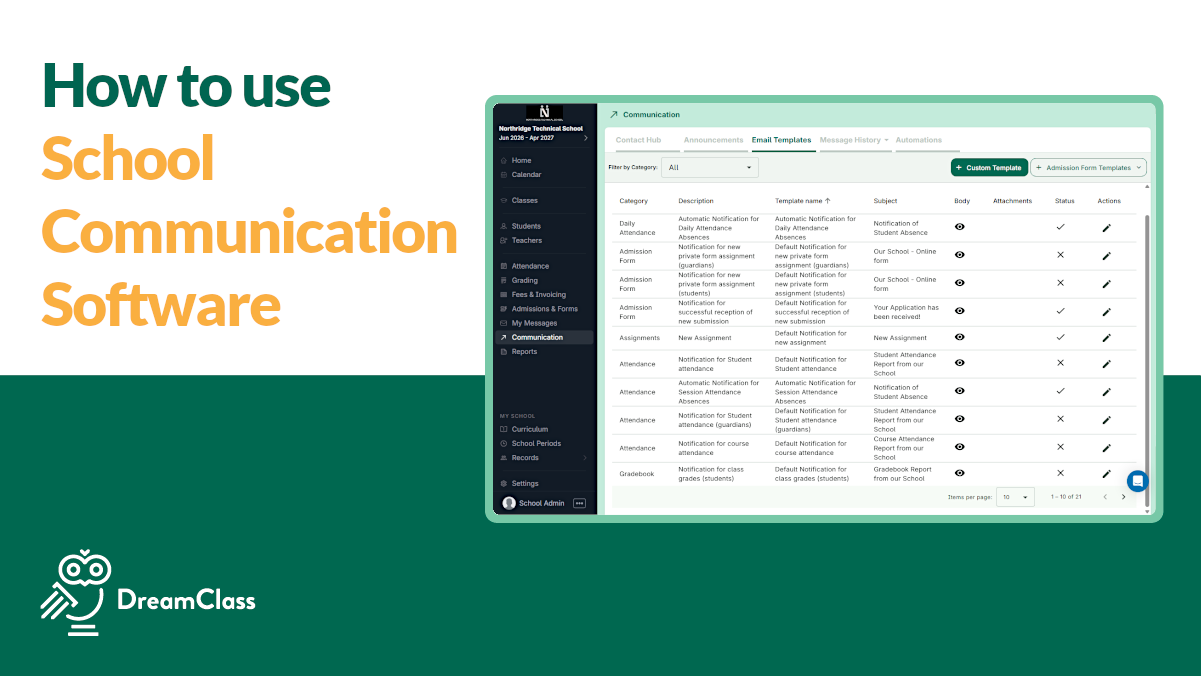
Generic email gives schools a fast way to write and send updates with a subject line, message body, and attachments. In DreamClass, schools can also save messages as reusable templates, which is useful for recurring notices like newsletters, event reminders, monthly updates, or parent announcements.
This is where the feature becomes more valuable than it first sounds. Rewriting the same school message over and over wears teams down. Templates remove that friction. Just as importantly, they make communication feel more consistent and more professional.
For many small schools, that’s the point, right there. They don’t want another complicated platform. They want fewer repeat tasks and cleaner parent communication. That language fits the way DreamClass audiences describe the problem: Keep everyone informed, save time and stop sending the same update three times.
Can DreamClass schedule school messages in advance?
Yes, DreamClass lets schools schedule emails for a specific date and time. That means your team can prepare a message early and trust the system to send it later.
This is one of those features that looks modest on paper and feels huge in practice. Scheduled sending helps schools stay ahead during busy weeks. It also reduces the usual last-minute scramble around events, deadline reminders, tuition notices, weekly updates, you name it.
In other words, it helps lean teams act organized, even when the week is packed.
Can you track who received a school message?
Yes, you can. DreamClass includes message history and recipient details, so schools can review what happened after a message was sent. If an email doesn’t go through, the system can show the reason, such as a “bounced address”.
Communication problems aren’t always caused by the sending tool. Sometimes the issue is an outdated parent email or a bad address in the record. With message history, schools get a clearer way to troubleshoot, instead of guessing and trying seven different things that might work.
This type of certainty also supports more dependable parent-teacher communication and faster follow-up, when schools need timely parent alerts.
When should schools use announcements instead of email?
Use announcements when information should stay available over time, not just land in an inbox once. In DreamClass, announcements let schools post documents, policies and resources that remain accessible inside the system.
There’s a distinction for a reason. Email works well for active outreach. Announcements work better for durable access.
Before using something like this, it’s worth noting why this feature is required. Many schools keep resending the same handbook, form, or policy because there is no stable “home” for it. As a result, families ask for files again, admins dig through inboxes again, and the same task repeats. A steady announcement area reduces that loop and gives the school a more dependable source of information. And that could host:
- School handbooks
- Family policies
- Recurring forms
- Shared resource files
- Evergreen parent information
So, the practical takeaway is simple. Announcements save time because they keep important resources accessible, without turning every document request into a fresh email chain. For busy administrators, that’s not a minor convenience, but a better operating rhythm.
Does DreamClass support SMS for schools?
Yes, DreamClass supports SMS as an add-on, giving schools a faster way to send short, time-sensitive updates to families, students, and teachers. That makes it useful when email feels too slow or too easy to miss.
The SMS walkthrough adds helpful detail here. Once SMS is enabled, schools can send texts from the communication area, including when contacting families. Schools can message guardians and, depending on the school setup, students as well. In addition, schools can also send SMS messages individually from a contact record and use SMS to reach teachers when needed.
That matters because texting works best when speed matters more than detail. A reminder about a schedule change, a quick attendance-related alert, or an urgent heads-up is usually a better fit for SMS than a long announcement.
How SMS works
There are also practical limits schools should know about. Messages over 160 characters count as an additional text. Also, SMS usage is counted by recipient, so messaging two contacts counts as two texts, even if they belong to the same family. That makes SMS a focused channel rather than one schools would want to use for every update.
DreamClass also gives schools visibility into what was sent. Admins can review SMS activity in message history, inspect sent message details, and check overall usage and available balance from the platform. And, if needed, schools can top up their SMS balance from the communication area.
One more detail strengthens the operational value: Teacher access can be controlled. By default, the option for teachers to send SMS is turned off, but schools can enable it when they want staff to share text-based updates too. That gives smaller schools a bit more flexibility, without turning texting into a free-for-all thing.
▶️ Watch the SMS video:
0:01 Hi there, this is Lida, and the congratulations on having your SMS activated. In order to use this functionality, I wanted to take a few steps on the platform so you can see how simple it is.
0:15 If you go to the communication that’s step one, you can select contact families, and now that we’ve added the SMS functionality in your portal, you’re actually able to contact by using a send SMS.
0:30 You can extend text to the guardians and or your students depending on whether you have a K through 12 community or adults.
0:38 You can type your text here and you can see that if you type more than 160 characters, it’s going to be considered as a second text.
0:48 One SMS counts as one number reached. So if you contact Melissa and Nick, this is Two separate texts even though they’re part of the same family.
1:00 Where can you see the messages that you’ve sent under the SMS list of your communications message history tab? If you want to be able to see what you’ve text, you can just hover over this dollar sign and you can see what the system has sent.
1:17 You can also use this functionality to go further down and see other SMS communication that you’ve sent. Where can you see the, um, where can you see the overall usage that you have under method history, under usage, you’re able to see the count of emails as well as SMS that you have available and top
1:40 up your balance. If you want to top up your balance, you can also use the SMS top up from the communication contact app.
1:50 You can do the same thing individually, which means that if you have to extend the text to Kelly Clarks, you can just select contact and select send SMS.
2:00 If you would like your teachers to be able to have access to that feature, you have to go to the teacher portal, and select the option can send SMS.
2:12 The default option is off, but if you want your teacher community to be able to send, SMS communication you can totally do that.
2:20 Last but not least, other communication you have an option to contact the teachers. The teachers can also be contacted via SMS so you can use that as well to reach out to your teachers.
2:32 Thank you so much for watching and thank you for using DreamClass. Have a beautiful day. Bye!
So, email still makes sense for fuller communication. However, SMS gives schools a more immediate option when timing matters, the message is short, and the goal is to make sure people see it fast.
And, if you want to see how it works altogether, just look at the communication strategy, overall.
▶️ Watch the Communication Strategy video:
0:00 Hi there, this is Lida, and this video is about communication. In DreamClass.io have a menu called Communication, and you’re able to contact specific families, specific students, and or teachers.
0:13 If your community doesn’t have parents and your students are adults, you just go here, select all your students, and contact.
0:20 If you would like to contact the families, meaning parents, you can select this menu and hit generic email. Now in the generic email, if you scroll down, you’re able to draft your own email by adding a subject line and a body and an attachment.
0:38 You can add files, multiple files, to your communication. If you would like to use the custom template, custom templates can come in very handy because you can you have a specific template that you reuse, and you can send it to your community.
0:53 Something which is amazing is that you can also schedule for later. So if you see this button right here, that allows you to set a time and a date, and the email will be sent on that day, and you can be rest assured that that was sent.
1:08 If you would like to verify who received your email, and who not, there’s a section in the message history that says email list, and if you click it, you have a list of all the recipients, and if you click View Details, we’re letting you know why the email wasn’t sent, and in this case, you can see that
1:27 the address email bounced back. Now, before we move forward, one more thing. In the communication, if you didn’t want to select the email which parents, but you just wanted to say, hey, go to all the class members of 2nd grade or AP Calculus, and you hit contact.
1:45 Once you click send email, you see that it doesn’t have all this specific drop download we saw before. The same thing.
1:52 Go and if you would like to include your team, such as teachers, you can include them in the communication by selecting class teachers.
2:00 Last but certainly not least is the text functionality. Now mind you that the text functionality comes as an add-on, right?
2:07 So if you want to- to enable it in your account, please contact support at DreamClass.io or do it from within your app.
2:14 There’s an option in the settings to request SMS. In here, the text is like, I write a text and it goes into the mobile phone.
2:24 You have a character limit, so please be mindful of that. We also show you the details here. And last thing for today is to know that in the communication hub, there’s a section called Announcements.
2:39 And I, And even though that doesn’t trigger a notification, I think it’s useful to know what it does. So, a lot of times our schools have specific documents or policies or things that they just want to share with our community.
2:51 And they always want to have a peace of mind that I added in the Announcement Board. That’s exactly what I think is why announcements were built.
2:58 So, if you go here and you add an announcement, important documents, that will sit in the system forever. And you won’t have to worry whether you attach those documents or whether they have access.
3:12 So, first, you create the announcement and secondly, you can go and you can add files. In this case, I will add just some random files, a beautiful, softer, line-up beach picture.
3:27 So, You now have this document and somebody can just open it up and they can see the file straight from the, umm, the account.
3:36 Thank you so much for watching this video and if you have any questions on how that works, please don’t hesitate to contact us at support at DreamClass.io
3:44 Or just leave a comment down below. Have a beautiful day and bye!
Who benefits most from school communication software like DreamClass?
DreamClass is a strong fit for schools that need better communication without enterprise-level complexity. That usually includes smaller teams that are trying to replace scattered tools with one cleaner workflow.
Not every school buys software for the same reason. Some want operational relief. Others want a more professional parent experience. Others simply need a system that helps them grow without adding more admin overhead. DreamClass fits well when the school wants structure, visibility and less back-and-forth, rather than a bloated setup. So, we have:
- Small private schools that want cleaner family updates and fewer manual follow-ups
- Homeschool collectives that want to keep families, tutors and students aligned, without losing their community feel
- Training schools that need clearer broadcast communication, message history and centralized records, especially those exploring tools for vocational schools
So, one pattern stands out. These organizations are not asking for flashy communication technology. They are asking for control, consistency and less chaos. That’s why the DreamClass communication workflow resonates with administrators, founders, and co-op leaders who have already outgrown spreadsheets, inbox searches and scattered parent chats.
What makes DreamClass different from basic school messaging tools?
A basic messaging tool sends messages. A better system supports the school around the message.
DreamClass does that by combining several useful pieces in one workflow:
Consider this: Many schools already have access to email. Some also use texting tools. Yet the real burden isn’t sending a message once. The real burden is sending the right message to the right group, reusing the message later, confirming what happened, and keeping the supporting files available after the send. That’s where a communication workflow becomes operationally meaningful. It offers:
- Audience-based communication to families, students, teachers, and classes
- Reusable message templates
- Scheduled sending
- Attachments
- Recipient history and delivery details
- Announcement storage for long-term resources
- Optional SMS for short updates
The difference is easier to see now, isn’t it? This isn’t just about outreach. It’s about reducing repeat work, making follow-up easier, and giving the school one communication rhythm, instead of several disconnected ones. For schools evaluating a broader school management software platform, that distinction goes to say that communication affects nearly every other workflow.
What do customer signals suggest about usability?
Communication tools only help if staff actually use them. That’s where usability comes in.
One DreamClass reviewer noted that the system is user friendly, intuitive, and efficient for organizing student information. Another described the support experience as fast and helpful. Those signals support the product story that DreamClass aims to reduce operational friction rather than add more of it.
That kind of feedback is especially relevant for founders and administrators who don’t want to spend weeks training staff on a complicated tool.
Why is school communication software worth it when a school is growing?
When a school is relatively small, scattered communication can feel manageable; right up until it doesn’t. As the school grows, weak processes become easier to spot. Messages get missed, files disappear, staff repeat work. You know the drill. But families expect faster updates, nonetheless.
That’s when school communication software stops feeling optional, doesn’t it?
DreamClass helps smaller schools replace ad-hoc communication with a system that’s easier to trust. It supports direct outreach, reusable templates, future scheduling, better follow-up, and long-term access to important documents. For schools that want to look more organized and feel less reactive, that’s real-life value.
Take the next step
If your school has outgrown inbox searching, duplicate reminders, and scattered parent chats, DreamClass offers a more organized way to communicate.
Related Reads
FAQ
Frequently Asked Questions
about School Communication Software in DreamClass
Can DreamClass send emails to families, students, and teachers?
Yes. DreamClass lets schools contact families, students, teachers, class members, and class teachers from the communication area.
Can schools save message templates in DreamClass?
Yes. DreamClass supports custom templates, which helps schools reuse recurring messages such as newsletters, reminders and routine family notices.
Can DreamClass schedule messages ahead of time?
Yes. Schools can set a future date and time, so an email is sent automatically later.
Does DreamClass include text messaging?
DreamClass offers SMS as an add-on. Schools can send short text updates to families, students and teachers, review SMS history, track usage, and top up their SMS balance when needed. Messages over 160 characters count as additional texts.
What is the difference between announcements and email in DreamClass?
Email is best for direct outreach. Announcements are better for documents and information that schools want to keep available in the system over time.